.png)
Managing multiple restaurant locations feels a bit like hosting a circus act, except the juggling involves flaming menus, impatient customers, and that one staff member who somehow always forgets to order chips at Store #3.
One venue is busy enough, but once you add several into the mix, everything multiplies: the pressure, the decisions, and the mad dashes between stores to see who’s run out of what.
As your restaurant expands, everything gets bigger: the stakes, the wins, the headaches, and yes, the spreadsheets. But here’s the good news: with the right systems, structure, and technology (hello, POS systems for restaurant chains), multi-site management doesn’t have to feel like organised chaos.
Here are expert-backed, real-world tips to help keep every location running smoothly, consistently, and profitably, all without losing your mind or your margins.
1. Standardise Everything (Yes, Everything)
If one location serves chips in a bowl, another on a plate, and another in a box… customers will notice. And they’ll talk.
To keep things consistent across locations, standardise:
- Menus
- Recipes
- Portion sizes
- Pricing
- Customer service expectations
- Opening and closing procedures
Think of it like giving all your restaurants the same playbook. It keeps things tidy, predictable, and efficient.
And here’s where your POS software becomes the hero: you can roll out menu updates, price changes, and specials across every location at the click of a button.
No phone calls, no “I didn’t get the memo”, no chaos.
2. Use a Centralised POS System
If you’re running multiple restaurants with different tills or outdated systems, you’re basically choosing pain.
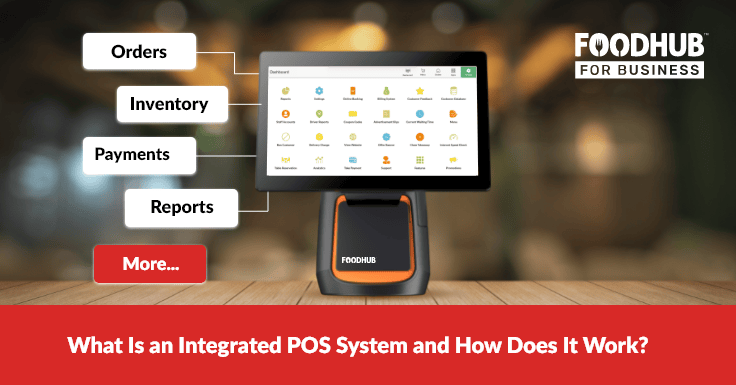
Modern POS systems for restaurants let you manage:
- Menus
- Pricing
- Stock
- Staff
- Orders
- Reports
…across every location from one central dashboard.
Imagine updating a single menu item in your head office system and watching it instantly sync to all branches. That’s the kind of magic good POS software delivers, minus the smoke and mirrors.
Plus, it gives you real-time reporting across all stores. No more guessing games. No more chasing managers for updates. Just clean, instant data.
3. Streamline Inventory & Your Supply Chain
If one location keeps running out of chicken while the others swim in it, your inventory system needs a hug. A strong multi-location operation needs:
- Shared suppliers
- Centralised ordering
- Consistent stock levels
- Standardised portioning
- A unified inventory system
When you use POS for inventory management, you can track:
- What each store uses
- What each store wastes
- What each store needs
- What each store keeps “forgetting” to order
This helps reduce food waste, cut costs, and avoid the classic: “We’re out of cheese again, sorry, folks!”
4. Invest in Staff Training & Shared Standards
Your team is your brand. And when your brand spans multiple locations, your staff needs to operate like a well-rehearsed band, not a garage group doing their own thing.
Create:
- Standard training manuals
- Shared onboarding
- Cross-location training swaps
- Manager coaching sessions
- Clear expectations for service and speed
When staff know what’s expected, each location feels familiar to customers, no surprises, no inconsistencies, no oddball service styles.
With the reporting tools in POS systems, you can track staff performance, labor costs, and productivity across all locations.

5. Keep Your Branding Consistent
A brand is like a promise, and customers expect you to keep it. No two stores should feel like distant cousins who barely speak. Keep uniformity across:
- Signage
- Menus
- Promotions
- Packaging
- Social media offers
- Loyalty rewards
With good POS software, you can roll out promotions across every venue instantly, or schedule them specifically for certain locations if one site needs a little boost.
6. Use Shared Reports to Make Smarter Decisions
Think of multi-location reporting like watching the replay after a football match; it shows you what really happened.
With a centralised POS system, you can compare reports across all locations:
- Sales
- Staffing
- Inventory
- Customer behaviour
- Profitability
This helps you spot:
- Your strongest-performing location
- Menus that work in one area but not another
- Where costs are bleeding
- Which location needs more support
- Which store deserves a pat on the back (and which needs a pep talk)
Data = power. And the right POS software puts that power in your hands.
7. Centralise Your Marketing for a Bigger Impact
Marketing for multiple locations can get chaotic fast, especially if every store runs its own specials, prices, or promotions.
Centralise your efforts:
- Seasonal campaigns
- Loyalty programmes
- SMS and email marketing
- Social promotions
- Limited-time offers
A strong POS system for restaurant marketing lets you target:
- All stores
- Some stores
- Or individual stores that need help
No more inconsistent messaging. No more random price differences. Just clean, coordinated marketing.
8. Focus on Communication & Leadership
Strong multi-location businesses all have one thing in common: great communication.
Create channels for:
- Managers to share updates
- Staff to raise issues
- Locations to collaborate
- Head office to roll out instructions
Regular check-ins keep all stores aligned, informed, and running in the same direction, not five different directions like a flock of confused seagulls.
Conclusion
Technology + Consistency = Multi-Site Success
Operating multiple locations doesn’t have to feel chaotic. With the right structure, strong communication, and reliable POS systems for restaurant operations, everything becomes clearer and easier to control.
And when you embrace smart POS software, you gain real-time data, smoother workflows, and consistency across every store, no matter how many you manage.
Multi-location success isn’t about luck. It’s about process, people, and the tech that ties it all together. Book a demo today and start your free trial to see how effortless reporting can be.