How to Cash Up Accurately with an EPOS System in 2026: A Simple Guide for Restaurants
Is your end-of-day total not matching your payments? Are your cash sales, card payments, and online orders making closing time feel more confusing than the dinner rush itself?
Cashing up sounds simple: count the money, check the sales, and close the day. But in a busy restaurant, takeaway, or cafe, one small mismatch can quickly become a closing-time headache. A missed refund, failed card payment, unrecorded online order, or unlogged cash movement can turn a quick end-of-day task into a full investigation.
With cash, card, contactless, online, and delivery payments all flowing through a restaurant, cashing up is no longer just about counting money. It is about verifying every transaction.
In this guide, we'll show you how to cash up with an EPOS system and how the Foodhub EPOS system can help streamline end-of-day reconciliation and reporting.
The End-Of-Day Problem Most Restaurants Face
Closing time should feel like the finish line. Instead, for many restaurants, it can feel like detective work.
The cash drawer says one thing. The card machine says another. Online orders are sitting somewhere else. A discount was applied during lunch. A refund happened during the evening rush. One staff member handled the EPOS in the afternoon, another took over for dinner, and now nobody is completely sure where the mismatch came from.
This is why daily totals often do not match. It is rarely one huge mistake. Most of the time, it is a few small things that build up during a busy shift.
A customer may have been given the wrong change. A card payment may have failed, but the order was still marked as paid. A refund may have been processed without being checked at the end of the day. An online order may have come through but not been matched with the correct sales report.
That is why cashing up should not be treated as a quick admin job. It is a daily control process. It helps restaurant owners protect revenue, spot mistakes early, and understand how money moves through the business.
What Should You Check Before Cashing Up?
Before counting the cash drawer, check what you are comparing it against. This is where many businesses go wrong. They start with the physical cash first, then try to make sense of the numbers afterwards.
A better approach is to start with your EPOS report. It gives you the expected totals before you check the actual money, including:
- Opening float
- Cash sales
- Card sales
- Online payments
- Refunds and discounts
- Voided orders
- Staff activity
- Cash in, cash out, and cash drops
- End-of-day sales report
This gives you a clearer starting point. Instead of asking, “How much cash is in the drawer?”, ask, “What does the EPOS system say we should have taken today?”
That shift matters because the cash drawer only shows one part of your business. Your EPOS shows the wider picture, including orders, payments, refunds, discounts, online sales, and staff activity.
The Right Time to Cash Up with EPOS
Most restaurants cash up at the end of the trading day, but that is not the only time it can happen.
If your restaurant has long opening hours, multiple shifts, or several staff members using the same payment area, it can be useful to cash up at the end of each shift. This makes it easier to spot where a mismatch occurred, rather than trying to trace it back after a full day of trading.
Restaurants can also do quick checks during staff handovers or after busy service periods. For example, if the lunch rush has been hectic, a quick EPOS check before the evening shift can stop a small issue from becoming a bigger closing-time problem.
Regular checks make cashing up easier by reducing the amount of activity you need to review at once. The longer you leave it, the harder it becomes to find the reason behind a difference.
Here’s a more concise version without losing the flow or key points:
Step-By-Step EPOS Cash-Up Process
 Step 1: Start with the Opening Float
A smooth cash-up starts before the first order. The opening float is the cash placed in the drawer to give customers change, so it should not be counted as sales.
For example, if you start with a £100 float and end with £500 in the drawer, your actual cash sales are £400. Count the float before trading begins, check it matches the expected amount, and record it in your EPOS system.
Step 2: Separate Your Payment Types
Restaurant payments now come from cash, cards, online orders, gift cards, delivery, and collection payments. Each payment type should be separated clearly, so you can see exactly where the money came from. Without this breakdown, cashing up becomes harder, and mistakes are easier to miss.
Step 3: Count the Physical Cash
Count the notes first, then the coins, and keep the float separate from the day’s takings. Compare the final cash amount with the cash sales shown in your EPOS report. If it does not match, count again before investigating refunds, cash drops, staff activity, or cancelled orders.
Step 4: Match Card Payments with the Card Terminal
Run the card machine settlement report and compare it with the EPOS card payment total. If the figures do not match, check for failed, duplicate, refunded, or incorrectly recorded payments. An integrated EPOS and payment setup makes this easier by keeping transactions connected.
Step 5: Review Online and Delivery Orders
Online orders can make cashing up more complex, especially when orders come through websites, apps, delivery platforms, and collection channels.
Check that paid orders are recorded correctly, cancelled orders are removed from sales totals, and refunded orders are accounted for. Your EPOS should show what happened across all order channels, not just the counter.
Step 6: Check Refunds, Discounts, and Cancelled Orders
Refunds, voids, promo codes, staff discounts, and cancelled orders can all change your final total. Review them before closing the day.
Staff logins also help managers see who processed each action, making the cash-up process more transparent.
Step 7: Compare Actual Money with Expected Sales
Now compare everything. Counted cash should match EPOS cash sales, card terminal totals should match EPOS card sales, and online payments should match completed orders. If the cash-up is short or over, review and record the reason.
Step 8: Record Any Difference
Never ignore a difference, even if it is small. Note the amount, possible reason, and who checked the cash-up. This helps spot repeated issues, such as rushed cash handling, failed payments, or unclear discount processes.
Step 9: Secure the Cash
Once totals are checked, remove the day’s takings, keep the correct float for the next shift, and store the cash safely. Record any cash drops properly and save the final report for accounting, tax checks, and future reviews.
Why EPOS Cash-Up Totals Go Short or Over
An EPOS cash-up can go short or over for many reasons, and not all of them mean something serious has happened.
The most common reasons include wrong change being given, a missed refund, a discount being applied incorrectly, a failed card payment, an online order not being recorded, staff using the wrong login, cash being removed without being logged, or a cancelled order still being counted as a sale.
This is why guessing is risky. If the totals do not balance, the best thing to do is follow the data. Check the EPOS report, review payment totals, look at refunds, and compare staff activity.
A clear process helps remove panic from the situation.
Manual Cashing Up Vs Digital Cashing Up
 Manual cashing up depends heavily on paper receipts, staff notes, printed reports, and memory. That might work for a very small setup, but it becomes harder as the business gets busier.
The problem with manual cashing up is that mistakes take longer to find. If a refund was missed or a card payment failed, you may need to dig through receipts, check the card terminal, and speak to staff before finding the reason.
Digital cashing up through an EPOS system gives restaurants a clearer view of sales data. Instead of relying only on the cash drawer, owners can check payment breakdowns, refunds, discounts, online orders, staff activity, and reports from one place.
This does not remove the need to count cash. It simply makes the full process more accurate and easier to manage.
How a Modern EPOS System Makes Cashing Up Easier
A modern EPOS system helps restaurants move from guesswork to visibility.
It can show daily sales reports, payment breakdowns, refund and discount records, staff login activity, online order tracking, real-time sales visibility, and end-of-day reports.
This matters because the EPOS is where the business activity happens. Every order, payment, discount, refund, and staff action should leave a record. So, when the numbers do not match, the EPOS gives managers somewhere to look.
For restaurant owners, this saves time and reduces stress. Instead of checking separate systems and trying to piece the day together manually, they can use EPOS reports to understand what happened.
The drawer holds the cash. The EPOS shows the business.
How Foodhub Helps Restaurants Cash Up Faster
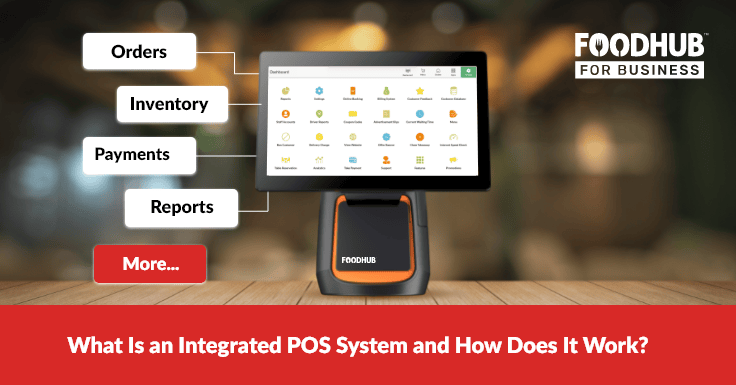
Foodhub EPOS helps restaurants make cashing up easier by connecting orders, payments, cash handling, and reporting in one workflow. Instead of checking everything separately, owners can get a clearer view of daily takings from one system.
1. Cash Payment Tracking
Foodhub EPOS supports traditional cash payments, which are still important for restaurants and takeaways where customers pay with physical money.
With this feature, restaurants can:
- Record cash payments directly in the POS
- Keep cash sales separate from card and online payments
- Check how much physical cash was taken during the shift
- Reduce confusion during end-of-day cash-up
2. Opening Cash Balance
Before the shift starts, staff can record the opening cash amount, also known as the float.
This helps restaurants:
- Log the starting cash amount clearly
- Make sure the float matches the expected amount
- Avoid confusion at closing time
- Know exactly how much cash was in the drawer before sales began
3. Cash in and Cash Out Tracking
Foodhub EPOS can help track money added to or removed from the cash drawer during a shift.
This is useful for:
- Recording cash added to the drawer
- Recording cash removed from the drawer
- Tracking cash drops during busy shifts
- Monitoring physical cash movement more accurately
4. Closing Cash Balance
At the end of the shift, restaurants can compare the expected cash amount with the actual cash in the drawer.
This helps managers:
- Check whether the drawer is balanced
- Spot if the cash is short or over
- Compare the closing amount with the EPOS records
- Reduce manual guesswork during cash-up
5. Discrepancy Checks
If the cash drawer does not match the expected amount, Foodhub EPOS can make it easier to identify possible reasons.
Managers can check:
- Cash sales
- Cash in and cash out records
- Refunds
- Discounts
- Voided orders
- Cash drops
- Staff activity
6. Clear Cash Records for Reporting
Foodhub EPOS helps restaurants keep cash records more organised, which can support daily reporting and audits.
This gives owners:
- Clearer records of cash transactions
- Better visibility over opening and closing balances
- More transparent cash handling
- Easier end-of-day reporting
7. Faster End-Of-Day Cash-Up
When orders, payments, and cash movements are recorded in one EPOS system, staff do not need to jump between receipts, card terminals, and manual notes.
This helps restaurants:
- Save time at closing
- Reduce human errors
- Improve cash handling accuracy
- Make daily reporting easier
- Close the shift with more confidence
Foodhub EPOS helps restaurants move from manual cash-up checks to a clearer, EPOS-led process. The drawer holds the cash. Foodhub EPOS shows where the money came from, where it went, and whether everything matches.
A Simple Epos Cash-Up Checklist for Restaurants
Before closing the day, follow the same process every time.
Count the opening float and make sure it was recorded correctly. Check cash sales, card payments, and online orders. Review refunds, discounts, and voided orders. Count the cash drawer carefully and compare the actual money with the expected sales. Record any difference, save your reports, and secure the cash.
The checklist may feel basic, but that is the point. A simple process followed every day is better than a complicated one that staff forgets during busy shifts.
Consistency is what makes cashing up easier.
Final Thoughts
Cashing up is not just a closing-time task. It is one of the simplest ways to protect revenue, improve financial accuracy, and maintain control over your restaurant's daily operations.
While cash still plays a role, modern restaurants are also managing card payments, online orders, refunds, and discounts across multiple channels. That is why an EPOS-first approach makes sense. When your sales, payments, and reporting are connected in one system, end-of-day reconciliation becomes faster, more accurate, and far easier to manage.
Foodhub EPOS helps restaurants and takeaways bring everything together, from order management and payment tracking to sales reporting and operational insights. The result is less time spent investigating discrepancies and more time focused on growing your business.
Ready to simplify your end-of-day reporting? Book a free demo and start your free trial with Foodhub for Business today.