How to Prepare Your POS for Multi-Location Growth
Opening a second restaurant is exciting, but it also changes the job. You are no longer managing one team, one menu, and one set of daily numbers. You are creating an operating model that must work even when you are not standing in every location.
A multi-location POS system can help by bringing sales, menus, orders, staff access, and reporting into a more consistent structure. The goal is not to add every available feature. It is to give each location the tools it needs while keeping the business simple enough to oversee, repeat, and improve.
The best time to prepare is before the next opening. A few decisions made early can reduce duplicate work, inconsistent data, avoidable costs, and disruption during rollout.
Executive summary
In brief: Build a repeatable store template, decide what will be controlled centrally, confirm location-level flexibility, compare total operating costs, and test the full order flow before launch. Choose a POS that fits the operation you have now and can support the next location without forcing unnecessary complexity.
Why a single-location setup becomes harder to manage
At one restaurant, an owner or manager can often correct a pricing error, answer a staff question, or check a missing item in person. Add another location and those informal fixes stop scaling. The same decision may be made differently by two managers, and the data may no longer be easy to compare.
Common warning signs include menu changes being entered more than once, reports using different categories, managers sharing overly broad logins, and staff relying on texts or spreadsheets to fill gaps. None of these issues means the team is failing. They usually mean the system and process were designed for one site.
The answer is not automatically a larger technology stack. More tools can create more logins, integrations, invoices, and training. A better first step is to identify which work should be standardized and which decisions genuinely need local flexibility.
Define the operating model before choosing technology
Create a standard store template
Document the setup that every location should share: menu categories, modifier logic, order types, tax settings, receipt rules, kitchen routing, device placement, staff roles, and daily reporting. This becomes the starting point for each opening and reduces the temptation to rebuild the system from memory.
Separate central controls from local decisions
Core menu structure, reporting categories, and permission rules usually benefit from central control. Store hours, item availability, local pricing, and location-specific specials may need controlled exceptions. Write down who can change each setting and how changes are approved.
Plan for consistency without forcing uniformity
Two locations may serve different neighborhoods or have different kitchen capacity. The POS should support the same brand standards while allowing approved variations. That balance helps operators compare performance without making every restaurant operate identically.
POS capabilities that support multi-location control
Centralized reporting and scheduled reports
A shared reporting structure makes location comparisons more useful. Confirm that sales, discounts, refunds, order channels, and labor data are categorized consistently, then decide which reports each role needs. Scheduled Reports can reduce manual follow-up by sending recurring information to owners and managers on an agreed cadence. The feature is most valuable when the report has a clear owner and a specific decision attached to it.
Master menu controls with location-level flexibility
Look for a master menu structure that can keep names, modifiers, and core items consistent while supporting approved location differences. Foodhub’s My Business Hub includes menu management from the restaurant management app, including adding or removing dishes, changing prices, and scheduling menu updates. For any provider, confirm whether a change applies to one location, selected locations, or every location before publishing it.
Connected ordering and kitchen workflows
Review the path for counter, phone, pickup, delivery, kiosk, and online ordering. Orders should reach the right location and preparation station without staff re-entering information. If you use outside platforms, confirm how the POS integrations handle order status, menu changes, and reporting in practice.
Role-based access and repeatable training
Build roles around responsibilities rather than individuals. An owner, regional manager, store manager, and team member should not need the same level of access. Test whether employees can work at more than one location, how their activity is attributed, and how access is removed when responsibilities change. A consistent interface and train-the-trainer plan can also reduce onboarding effort as the team expands.
Reliable hardware, connectivity, and support
Standardize a store kit where possible, but verify that each location’s counter space, network, printer placement, and kitchen environment are compatible. Ask what continues to work during an internet interruption, what syncs after service returns, and which payment functions may be limited. Also confirm support hours, escalation paths, replacement procedures, and any added support fees.
Useful inventory visibility
Inventory requirements vary widely. Some operators need item-level availability; others need ingredient tracking, purchasing, or transfers between locations. Map the actual process before buying an advanced module. Confirm what the POS handles directly, what requires an integration, and whether the added detail will be maintained consistently by each team.
Avoid common multi-location mistakes
Before you sign a lease on a new space, you must audit your current technology. Some systems are excellent for a single cafe but are not built for the complexity of a multi-unit enterprise. Recognizing these red flags early will save you thousands of dollars in future migration costs.
You can’t roll out menu changes everywhere at once
If you have to manually update every terminal in every shop to change a single ingredient, your system is holding you back. A scalable system should allow you to "publish" changes to all locations with one click. If your current process involves phone calls to managers to "check the prices," you are ready for an upgrade.
Reports don’t match across locations
Inconsistent reporting is a sign that your data categories are not aligned. If one shop labels a sale as "Delivery" and another labels it as "Online Order," your brand-wide totals will be inaccurate. You need a system that forces the same reporting structure across every branch you own.
Permissions are messy
As you grow, you cannot be the only person with administrative access, but you also can't give everyone full control. If your current system doesn't allow for "Regional Manager" or "Store Manager" roles, your security is at risk. Managing dozens of individual logins for the same person across different sites is a recipe for a security breach.
Do not copy every workaround from the first location
A second opening can turn a temporary workaround into a permanent operating rule. Before copying the first store, ask why each spreadsheet, manual entry, shared login, or duplicate menu update exists. Remove the workaround when the new system or a clearer process can solve the underlying problem.
Do not centralize decisions that require local judgment
Central control is useful for brand standards, security, and comparable data. It can become a bottleneck when a store manager cannot update an unavailable item, respond to local demand, or correct an urgent operational setting. Define a small set of approved local controls with clear limits and accountability.
Do not pay for complexity the team will not maintain
An advanced feature only creates value when the team can use it accurately and consistently. During demonstrations, ask who will enter the data, how often it must be maintained, and which decision it will improve. If the answer depends on extra manual work at every location, include that labor in the total cost comparison.
Compare systems by fit and total operating cost
A provider may offer multi-location features but still be a poor fit if daily workflows become harder or every new location adds layers of fees. Compare the complete setup over the same time period, including software, hardware, payment processing, onboarding, integrations, support, and paid add-ons.
The Foodhub restaurant POS comparison guide offers a useful starting point for comparing leading platforms across pricing, integrations, operational flexibility, customer ownership, training, and multi-location scalability. Use the guide to build a shortlist, then validate every important workflow in a live demonstration.
Ask each provider to show—not simply describe—how to:
publish one menu change to selected locations;
compare the same sales report across locations;
add a location without rebuilding the account;
limit a manager’s access to the appropriate stores;
route an online order to the correct kitchen; and
calculate the complete cost of adding the next location.
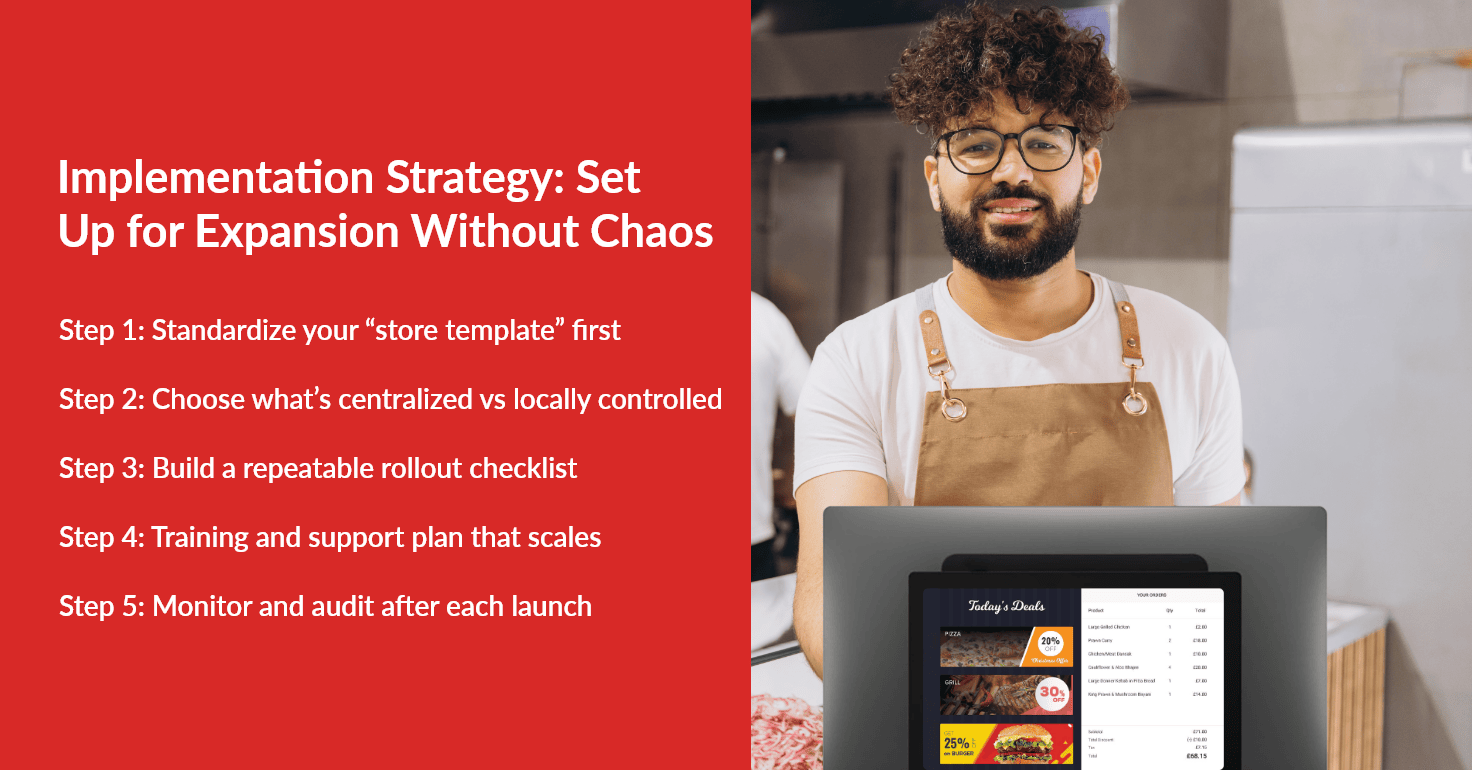
A five-step POS rollout plan for each new location
1. Audit the current operation
List every ordering channel, device, integration, report, staff role, and manual workaround in the current location. Decide what should be kept, simplified, replaced, or tested before it becomes part of the next store.
2. Build and protect the store template
Create the approved menu, permissions, taxes, order types, kitchen routing, and reporting categories. Assign owners for central settings and location exceptions so managers know where control begins and ends.
3. Test the complete order journey
Run realistic orders through every channel and payment method. Test modifiers, discounts, refunds, receipt printing, kitchen tickets, order status, reporting, and internet-loss procedures. Include the people who will use the system during service, not only the project team.
4. Train by role and launch in stages
Give each role only the training it needs, then practice common exceptions. If you are changing providers, use an off-peak launch window and a staged transition where appropriate. The goal is to protect service rather than force every change into one moment.
For a deeper transition plan, see How to Switch a Restaurant POS System Without Downtime.
5. Review the first 30 days
Check whether menus, permissions, routing, and reports are being used as designed. Look for repeated voids, open-item entries, missing modifiers, or location data that cannot be compared. Correct the process early, document what changed, and update the template before the next opening.
How Foodhub can support a multi-location operation
Even the most experienced operators make mistakes when scaling their technology. Being aware of these common pitfalls will help you avoid the "growing pains" that sink many expanding businesses.
Choosing based on cost alone
The "cheapest" system often ends up being the most expensive because it lacks the features you need to scale. If you have to spend 10 hours a week manually combining reports, you are losing money. Consider the "Total Cost of Ownership," which includes your time, staff training, and potential lost sales from system crashes.
Foodhub provides tools for centralized reporting, menu management, and visibility across multiple restaurant locations. My Business Hub also supports multi-location oversight, location-specific menus and pricing, staff roles, and remote menu updates.
That does not mean every restaurant needs the same configuration. The right setup depends on service model, ordering channels, location count, existing hardware, integrations, and management structure. Foodhub can work alongside parts of an existing setup where appropriate, allowing operators to evaluate a practical transition without creating unnecessary disruption.
If you are preparing to add a location or deciding whether your current POS can keep up, speak with the Foodhub team about your current workflow, expected growth, and total operating costs. The objective is to determine whether Foodhub is the right fit—not to add technology your team does not need.